GitOps Everything with ArgoCD
This post covers the migration from Flux CD to ArgoCD, the Pulumi detour that didn’t work out, and building an App-of-Apps Helm chart to manage all cluster workloads via GitOps.
The Pulumi Detour
The original plan called for Pulumi to handle infrastructure-as-code. It seemed like a natural fit — write real TypeScript, get state management, handle both machine and workload layers from one tool. The problem became clear within a few hours of research: no Pulumi provider exists for Sidero Omni.
The @pulumiverse/talos provider does exist, but it talks directly to the Talos API to manage machine configs. Omni already owns that layer. Running both would create a fight over machine configuration — Pulumi pushes a config, Omni detects drift and pushes its own, repeat forever.
The takeaway was that Omni and Pulumi occupy the same layer. Since Omni was already running and managing all seven nodes, Pulumi had no role to play. The scaffolding in infrastructure/pulumi/ was deleted, the design doc marked deprecated, and the search for a workload-layer tool continued.
Why ArgoCD Over Flux?
Flux CD was actually deployed first. It worked for about a day before breaking with a kustomization path not found error that proved stubborn to debug. But the real issues were architectural:
- Flux has no UI. Debugging sync failures means reading
kubectloutput and parsing YAML status conditions. ArgoCD ships a web dashboard that shows the full resource tree, sync status, and diff for every application. - Multi-source support. ArgoCD’s multi-source Applications let you pull a Helm chart from an upstream registry and overlay values from your own Git repo — in a single Application CR. Flux requires separate
HelmRepository,HelmRelease, andKustomizationresources to accomplish the same thing. - App-of-Apps. ArgoCD has a first-class pattern for bootstrapping an entire cluster from a single Helm chart that renders child Application CRs. One
kubectl applyand every workload is declared and tracked. - Adoption without downtime. ArgoCD can take ownership of existing Kubernetes resources by matching them through annotation-based tracking. Cilium and Longhorn were already running; ArgoCD adopted them in place.
Flux was uninstalled (flux uninstall), its namespace deleted, and its CRDs cleaned up. None of this touched the running Cilium or Longhorn pods — those are standalone Helm releases that continued operating independently.
Removing Flux CD
The cleanup was straightforward but required care. Flux installs CRDs that can have finalizers, and deleting the namespace before cleaning up custom resources can leave things stuck.
# Uninstall Flux (removes controllers + namespace)
flux uninstall --silent

# Verify namespace is gone
kubectl get ns flux-system
# Expected: NotFound

# Remove any leftover CRDs
kubectl get crds | grep fluxcd | awk '{print $1}' | xargs kubectl delete crd
The important thing: Flux never managed Cilium or Longhorn directly (its Kustomization was broken), so removing it had zero impact on running workloads. They kept running as plain Helm releases with no controller watching them — exactly the state ArgoCD would adopt from.
App-of-Apps Pattern
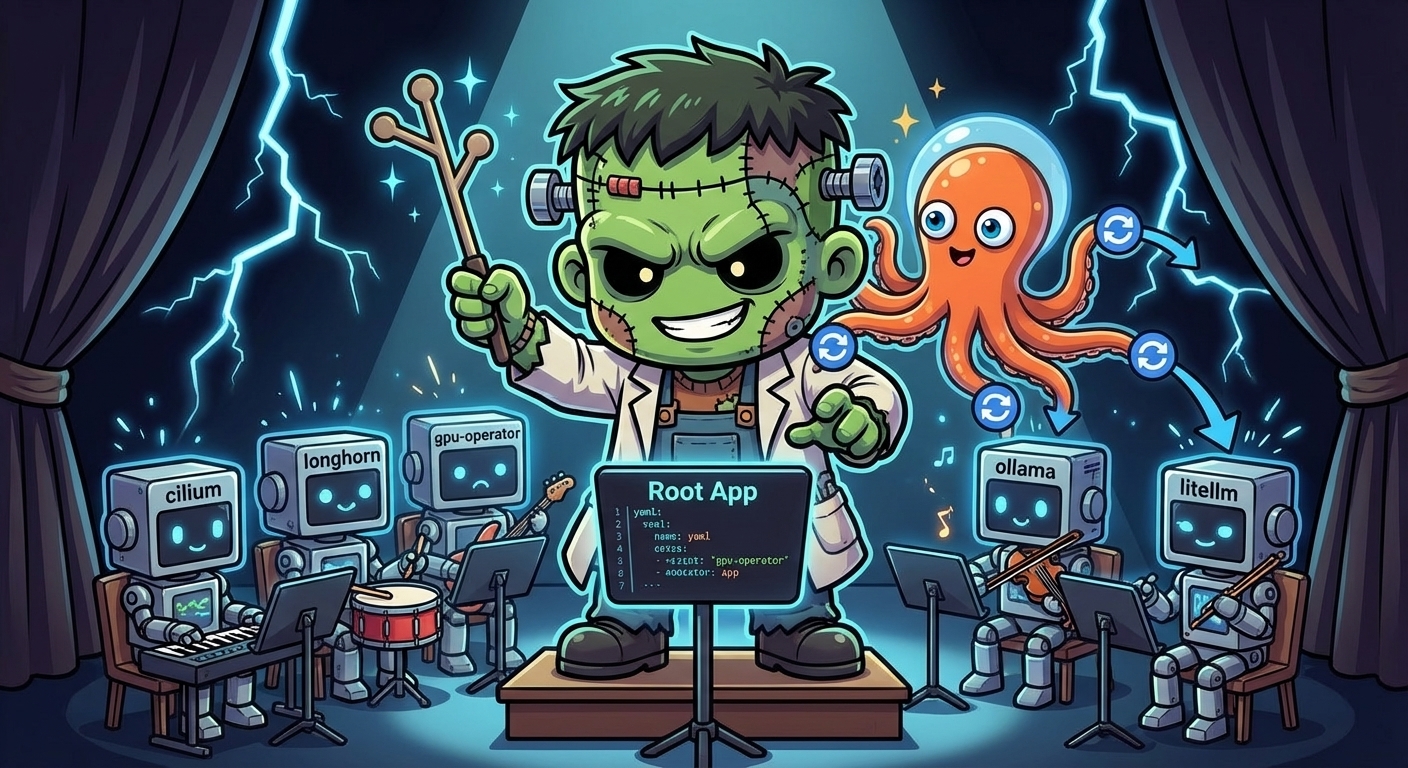
The core idea is simple: a single Helm chart whose only job is to render ArgoCD Application custom resources. You install one “root” Application that points to this chart, and ArgoCD renders the templates, discovers the child Applications, and syncs them all.
Here is the hierarchy for the frank cluster:
root (Application)
  |
  +-- infrastructure (AppProject)
  |
  +-- cilium (Application)
  |     upstream: helm.cilium.io / cilium v1.17.0
  |     values:   apps/cilium/values.yaml
  |
  +-- cilium-config (Application)
  |     source: apps/cilium/manifests/   (L2 pool, L2 policy, Hubble UI LB)
  |
  +-- longhorn (Application)
  |     upstream: charts.longhorn.io / longhorn v1.11.0
  |     values:   apps/longhorn/values.yaml
  |
  +-- longhorn-extras (Application)
  |     source: apps/longhorn/manifests/  (GPU-local SC, Longhorn UI LB)
  |
  +-- gpu-operator (Application)
        upstream: helm.ngc.nvidia.com/nvidia / gpu-operator v25.10.1
        values:   apps/gpu-operator/values.yaml
Each “main” app (cilium, longhorn, gpu-operator) pulls its Helm chart from the upstream registry. Each “-extras” or “-config” companion app points at a manifests/ directory in the Git repo for resources that sit outside the Helm chart — things like Cilium’s LoadBalancerIPPool, Longhorn’s custom StorageClass, or LoadBalancer services that expose UIs at fixed IPs (Longhorn at 192.168.55.201, Hubble at 192.168.55.202).
Root Chart Structure
The root chart is minimal. Its Chart.yaml declares no dependencies:
# apps/root/Chart.yaml
apiVersion: v2
name: frank-infrastructure
version: 1.0.0
description: App-of-Apps for frank cluster infrastructure
Global values are kept to three fields — the Git repo URL, the target branch, and the in-cluster API server address:
# apps/root/values.yaml
repoURL: https://github.com/derio-net/frank.git
targetRevision: main

destination:
  server: https://kubernetes.default.svc
These values are injected into every child Application template via {{ .Values.repoURL }}, {{ .Values.targetRevision }}, and {{ .Values.destination.server }}. Changing the repo URL or branch in one place updates every application.
The templates directory also contains namespace manifests with Pod Security Admission labels. Longhorn, for example, needs privileged because it uses hostPath volumes:
# apps/root/templates/ns-longhorn.yaml
apiVersion: v1
kind: Namespace
metadata:
  name: longhorn-system
  labels:
    pod-security.kubernetes.io/enforce: privileged
    pod-security.kubernetes.io/enforce-version: latest
An AppProject scopes all child applications into a single project called infrastructure, with full access to any namespace and resource kind on the local cluster:
# apps/root/templates/project.yaml
apiVersion: argoproj.io/v1alpha1
kind: AppProject
metadata:
  name: infrastructure
  namespace: argocd
spec:
  description: Frank cluster infrastructure components
  sourceRepos:
    - '*'
  destinations:
    - namespace: '*'
      server: {{ .Values.destination.server }}
  clusterResourceWhitelist:
    - group: '*'
      kind: '*'
Multi-Source Applications
This is the pattern that makes the whole setup clean. Each Application CR declares two sources — the upstream Helm chart and a Git ref for local values:
# apps/root/templates/cilium.yaml
apiVersion: argoproj.io/v1alpha1
kind: Application
metadata:
  name: cilium
  namespace: argocd
spec:
  project: infrastructure
  sources:
    # Source 1: upstream Helm chart
    - repoURL: https://helm.cilium.io/
      chart: cilium
      targetRevision: "1.17.0"
      helm:
        releaseName: cilium
        valueFiles:
          - $values/apps/cilium/values.yaml
    # Source 2: Git repo (referenced as $values)
    - repoURL: {{ .Values.repoURL }}
      targetRevision: {{ .Values.targetRevision }}
      ref: values
  destination:
    server: {{ .Values.destination.server }}
    namespace: kube-system
  syncPolicy:
    automated:
      prune: false
      selfHeal: true
    syncOptions:
      - ServerSideApply=true
      - RespectIgnoreDifferences=true
  ignoreDifferences:
    - group: ""
      kind: Secret
      jsonPointers:
        - /data
The second source uses ref: values to give it a name. The first source then references it as $values/apps/cilium/values.yaml. This lets ArgoCD pull the chart from one place and the values from another, all in a single Application. Upgrading Cilium means changing targetRevision: "1.17.0" to the new version and pushing.
A few things worth noting in the Cilium template:
ServerSideApply=trueis critical for adoption. It uses server-side apply semantics, which merge fields rather than replacing entire objects. This prevents ArgoCD from blowing away fields set by other controllers.selfHeal: truemeans if someone manually edits a Cilium resource, ArgoCD reverts it within a few minutes. Git is the source of truth.prune: falseprevents ArgoCD from deleting resources that disappear from the chart. For CNI infrastructure, a cautious approach to deletion is wise.ignoreDifferenceson Secrets prevents ArgoCD from constantly showing Cilium’s auto-generated secrets as “out of sync.”
The Longhorn template follows the same multi-source pattern but without the ignoreDifferences block since Longhorn does not generate secrets that drift.
For companion resources like Longhorn’s custom StorageClass, a separate single-source Application points directly at the manifests directory:
# apps/root/templates/longhorn-extras.yaml
apiVersion: argoproj.io/v1alpha1
kind: Application
metadata:
  name: longhorn-extras
  namespace: argocd
spec:
  project: infrastructure
  source:
    repoURL: {{ .Values.repoURL }}
    targetRevision: {{ .Values.targetRevision }}
    path: apps/longhorn/manifests
  destination:
    server: {{ .Values.destination.server }}
    namespace: longhorn-system
  syncPolicy:
    automated:
      prune: false
      selfHeal: true
No Helm, no multi-source — just raw YAML files from a directory. ArgoCD watches the path and applies whatever it finds there.
Adopting Existing Workloads
This was the step that had to go right. Cilium provides all pod networking, and Longhorn provides all persistent storage. Reinstalling either would mean cluster downtime.
The key is ArgoCD’s annotation-based resource tracking. Instead of using labels (which Helm already manages), ArgoCD writes its own annotation to track ownership. This is configured in the ArgoCD values:
# apps/argocd/values.yaml (excerpt)
configs:
  cm:
    application.resourceTrackingMethod: annotation
With this setting, ArgoCD does not conflict with existing Helm labels on Cilium or Longhorn resources. When it syncs, it adds an argocd.argoproj.io/tracking-id annotation and begins managing the resource — no delete-and-recreate, no label overwrites.
The adoption sequence was:
- Install ArgoCD via Helm (the bootstrap step).
- Apply the root Application:
kubectl apply -fthe rendered root chart. - ArgoCD discovers child Applications (cilium, longhorn, etc.) and begins syncing.
- For each child, ArgoCD compares the desired state (from the Helm chart + values) against the live cluster state.
- Because the chart versions and values match what was already deployed, ArgoCD finds minimal diff and reports “Synced.”
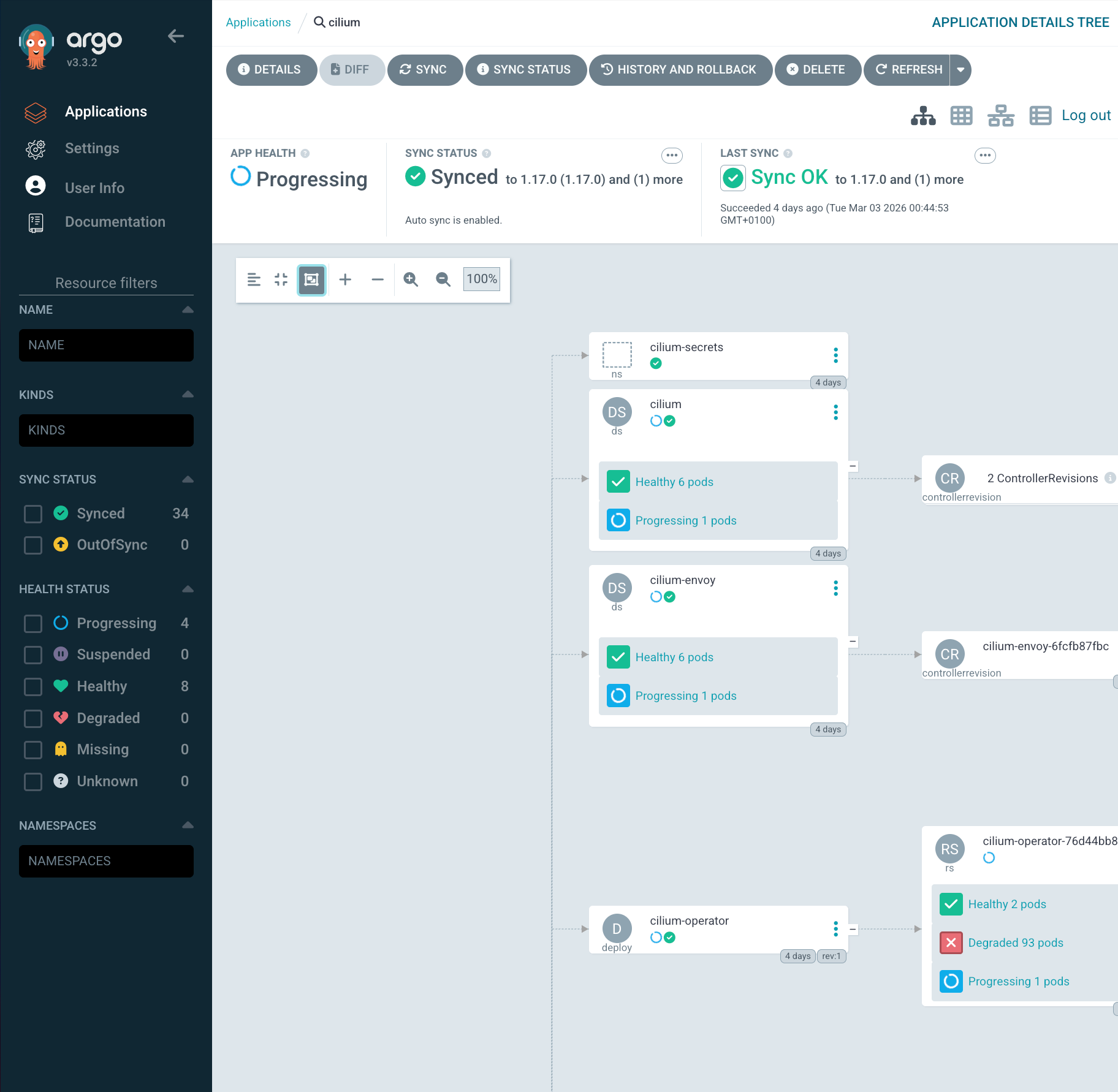
The entire process took under five minutes and required zero pod restarts. Cilium agents kept routing packets, Longhorn kept serving volumes, and ArgoCD quietly attached its tracking annotations in the background.
Self-Managing ArgoCD
ArgoCD has a chicken-and-egg problem: it cannot install itself. The initial deployment is a one-time manual Helm install:
helm repo add argo https://argoproj.github.io/argo-helm
helm install argocd argo/argo-cd \
  --namespace argocd --create-namespace \
  -f apps/argocd/values.yaml
After that, ArgoCD can manage its own values. The ArgoCD Helm values in apps/argocd/values.yaml configure it for a homelab context:
# apps/argocd/values.yaml (key settings)
controller:
  replicas: 1
server:
  replicas: 1
  extraArgs:
    - --insecure
  service:
    type: LoadBalancer
    annotations:
      io.cilium/lb-ipam-ips: "192.168.55.200"
dex:
  enabled: false
global:
  affinity:
    nodeAffinity:
      type: hard
      matchExpressions:
        - key: zone
          operator: In
          values:
            - core
configs:
  params:
    server.insecure: true
  cm:
    application.resourceTrackingMethod: annotation
A few decisions here:
- Single replicas everywhere. This is a homelab, not a production SaaS platform. HA is nice but wastes resources on three NUCs.
--insecureandserver.insecure: truedisable TLS on the ArgoCD server itself. A Traefik reverse proxy on the management node handles TLS termination with Let’s Encrypt certificates. No need for ArgoCD to manage its own certs.- Cilium LoadBalancer IP via
io.cilium/lb-ipam-ipspins ArgoCD to192.168.55.200. Cilium’s L2 announcement policy handles ARP responses so any machine on the LAN can reach it. The same annotation pattern is used to expose Longhorn UI at.201and Hubble UI at.202. - Node affinity to
zone: corekeeps ArgoCD on the mini NUCs. It should not land on the GPU worker or the Raspberry Pis. - Dex disabled — no SSO yet. Built-in admin credentials for now, with Authentik integration planned for later.
Handling Degraded Applications
Not every application starts healthy. The GPU Operator was deployed as an ArgoCD Application even though the RTX 5070 is not yet detected on the PCIe bus. Its template uses manual sync policy instead of automated:
# apps/root/templates/gpu-operator.yaml (excerpt)
  syncPolicy:
    # Manual sync -- GPU hardware not yet detected
    syncOptions:
      - CreateNamespace=false
      - ServerSideApply=true
The automated block is commented out in the template, ready to be uncommented once the hardware issue is resolved. ArgoCD shows this application as “OutOfSync/Missing” in the dashboard, which is expected. When the GPU is fixed, the operator pods will start, and switching to automated sync is a one-line YAML change and a git push.
What We Have Now
At this point the cluster has:
- Full GitOps via ArgoCD App-of-Apps — one root chart bootstraps the entire infrastructure stack.
- Multi-source Applications — upstream Helm charts paired with local values, no chart vendoring needed.
- Zero-downtime adoption — Cilium and Longhorn were absorbed by ArgoCD with annotation-based tracking, no restarts.
- Self-healing — ArgoCD detects and corrects configuration drift automatically via
selfHeal: true. - Single repo as source of truth — machine config in
patches/, workload config inapps/, both in the same Git repository.
The two-layer split is clean: Omni owns the machines (kernel, extensions, disk mounts), ArgoCD owns the workloads (Helm releases, manifests, namespaces). They never overlap, and changes to either layer follow the same workflow: edit YAML, push to main, watch it converge.
References
- ArgoCD — Declarative GitOps continuous delivery for Kubernetes
- ArgoCD App-of-Apps Pattern — Cluster bootstrapping with the App-of-Apps pattern
- ArgoCD Multi-Source Applications — Using multiple sources (Helm chart + Git values) in a single Application
- ArgoCD Resource Tracking — Annotation-based vs. label-based resource tracking methods
- ArgoCD Sync Options — ServerSideApply, selfHeal, prune, and other sync options
- ArgoCD Helm Chart (argo-helm) — Official Helm charts for Argo projects
- Flux CD — CNCF GitOps toolkit for Kubernetes
- Kubernetes Pod Security Admission — Pod Security Standards enforcement at the namespace level